
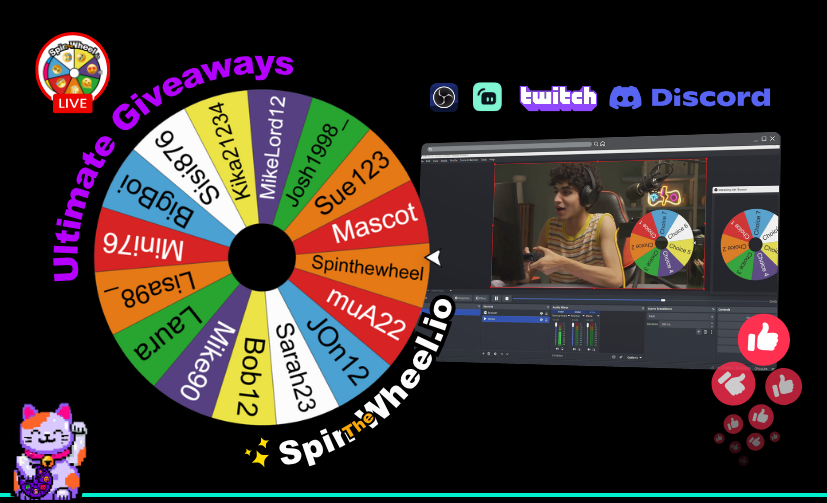
Spin the Wheel: Ultimate Free Overlay for OBS, Twitch & Discord
Modern content creation, viewer retention relies heavily on interactivity. Streamers and influencers no longer just broadcast to an audience, they create with them.
Spin the wheel, the premier, 100% free interactive tool is taking gamers and influencers to the next level. Whether you are looking to gamify your Twitch chat, engage your Discord community, or run provably fair giveaways in OBS or Streamlabs, Spin the Wheel stands out as the ultimate browser source overlay and bot combo.
What Makes Spin the Wheel the #1 Overlay for Content Creators?
Unlike generic spinners that require manual entry or lack customisation, spinthewheel.io seamlessly connects your stream overlay, live chat, and Discord server into a unified interactive engine.
- Twitch Live Integration: Viewers enter via simple chat keywords like !enter.
- Provably Fair Replays: Cryptographically signed result links are posted directly to chat.
- Multi-Wheel Engine: Spin up to 8 wheels at once using the Discord /spin command.
- Rich FX Suite: Custom themes, ticking sounds, victory music, animations, and confetti.
- Broadcaster Ready: Native support for OBS Studio, Streamlabs, Twitch, and Discord.
Core Features That Power Up Your Stream
1. Direct Twitch Chat Integration & Instant Contestant Pulling
Forget copy-pasting names while trying to stay focused on gameplay. With the Twitch Giveaways panel:
- One-Keyword Entry: Tell viewers to type a keyword (e.g., !enter) in chat.
- Automated Entrant Collection: The overlay tracks entrant counts live on screen in real time.
- Single Entry Protection: Each viewer is automatically limited to one entry, keeping giveaways fair and stress-free.
2. Multi-Wheel Mayhem (Up to 8 Wheels at Once!)
Looking to add complexity to your challenge streams or game nights? Using the official Discord bot or platform editor, creators can spin up to 8 wheels in a single command.
Example Command: /spin wheels: Player 1, Player 2 ; Pistol, Sniper, Shotgun ; No Healing, Double Speed
Result: Simultaneously picks a contestant, their weapon loadout, and a gameplay handicap in one smooth move!
3. Cryptographically Signed ‘Provably Fair’ Replays
To build absolute trust with your community, every spin generates a signed replay link posted directly to chat.
- Tamper-Proof: The outcome is locked with a digital signature the moment it’s generated, it cannot be altered even if the wheel is edited later.
- Timestamped Proof: Anyone can click the replay link to watch the exact spin recreate with all visual and audio effects, verifying the win was 100% genuine.
4. Customisable FX, Sounds, and Visual Styling
Match your overlay directly to your channel's aesthetic:
- Custom colour palettes, fonts, and themes.
- Build-up spin audio, ticking sounds, and victory fanfare.
- Post-spin celebration triggers like on-screen confetti.
Universal Compatibility Across Your Entire Setup
No subscriptions, paywalls, or complex setup required. spinthewheel.io operates as a lightweight, transparent browser source across your entire tech stack:
- Twitch Chat Integration: Connect directly via the Twitch API to run automated viewer entries with keyword tracking and auto-post fair results straight into chat.
- OBS Studio Setup: Add it as a Browser Source with ?stream=1 appended to the URL for an ultra-low CPU footprint and transparent background.
- Streamlabs Integration: Works seamlessly as a Custom Widget Source, offering easy drag-and-drop overlay placement right over your gameplay.
- Discord Server Bot: Use slash commands like /spin for instant chat answers combined with a one-click link to animated web replays.
How to Set Up Spin the Wheel on Stream in 3 Steps
Setting up your live giveaway or challenge wheel takes under two minutes:
- Connect Your Channel: Sign in to spinthewheel.io and authorize your Twitch account or add the Discord bot to your server.
- Copy the Overlay URL: From the Twitch Giveaways panel (or any saved wheel on the site), copy your unique URL. Append ?stream=1 to transform any standard wheel into a clean browser overlay.
- Add to OBS / Streamlabs: Create a new Browser Source in your scene, paste your link, and set your desired resolution.
Whenever you trigger a spin, the wheel lands in real time right over your video feed, keeping your chat on the edge of their seats!